Many of the aspects discussed below apply to authentication on native applications running on mobile devices too, however the focus is more on access from applications running as applications hosted inside browsers. And they cover only authentication where a person is involved - machine-to-machine authentication is a topic for a future discussion.
I. Features of a good authentication system
A. Unhackable
Reduce to a minimum all risks where a user’s account is compromised due to unauthorized access/use and protect the user’s data. I am referring here to risks that are under the control of the authentication system provider and/or integrator.
B. Easy to use
Authentication is never a goal per se - it is just a “gate to the castle”, that the user has to go through to get to the business of what she/he needs to do in your app. The less friction embedded in the sign-in, sign-up and credentials reset processes, the better. Make it easy for the user to monitor/be alerted on & view their sign-in activity.
C. Self-service
Avoid as much as possible situations where a user locks herself/himself out of the system and, if a user gets into that situation, allow for recovery processes that don’t result in the user needing to contact a support service to regain system access.
Guidance for further reading:
- An expansion of the above 3 concepts (chapters II - IV) - this is a pretty long walkthrough/personal observations & survey of the lay of the land, to set the stage for key concepts and categorizations; feel free to jump to the last 3 chapters if you already have a good background on authentication systems and how they work.
- My observations on integrations with IAM-focused Identity Providers (V)
- A proposal for what I think would be an ideal setup (VI).
- Implementation considerations related to my ideal setup (VII).
- Conclusion (VIII).
To add more bounds to the context of my reflections: my focus here is on systems that integrate with OAuth2 providers, which are the main mechanisms to provide SSO (Single Sign-on) experiences for consumers. And not on other enterprise (often internal) authentication mechanisms such as Kerberos or SAML.
II. Unhackable Systems
Before we go into a few more details on this topic, I’d like to categorize what I see to be the main avenues through which authentication systems are deployed and how businesses leverage them.
A. Taxonomy of Authentication Providers
1. “Apex” Identity Providers (IdP):
In this category, I put platforms like Google, Microsoft, Apple, Facebook, Amazon & other large platforms for e.g. in Chinese markets (that I am not familiar with) - i.e. providers that don’t allow sign-ups with other provider accounts and typically also run some sort of a social platform. The source for authentication decisions does not get delegated to other external entities. And they rollout and support their own “Sign-in with XYZ” Social Login solutions.
2. Other Social Login Providers:
Other providers running social platforms which allow the creation of account credentials in their own system or options to sign-up (delegation) with other providers (typically the Apex providers). E.g. LinkedIn, Github, Discord, Telegram, X, etc. These providers also support the “Sign-in with XYZ” Social Login solutions.
3. IAM-focused Service Providers:
These are Identity Providers whose main line of business is focused on providing Identity and Access Management solutions to businesses. Account login credentials can be created directly on these IdPs’ systems (i.e. the authentication decisions are only driven by interrogating credentials inside these systems) OR the authentication decisions are delegated externally to providers from lists A and/or B, through Social Logins (“Sign-in with XYZ”) support. Examples in this category: Okta, Auth0, Clerk, Ping Identity, JumpCloud, Keycloak, AWS Cognito, etc.
B. Taxonomy of Authentication Integrations
How do B2C and B2B enterprises (outside of those listed above) authenticate their users? Some broad integration categories:
1. Integrations with IAM-focused Service Providers
This is likely the case for the majority of businesses (at least medium and large ones). In these situations the bulk of authentication decisions is delegated to these IdPs. These might be done through UI interfaces that convey traces of who is the underlying IdP OR the user might not even be able to tell who the main IdP provider is under the hood, because the whole authentication UX flow is branded under themes / UIs that look fully integrated with enterprise’s own branding.
2. Fully Built-in House Solutions:
I’d say we find here either enterprises that really know what they are doing (i.e. they have the deep expertise and resources to fully take on these functions internally) or those who don’t know what they are doing (typically small business / systems that hack something together to provide the semblance of having an authentication system - likely a simple Basic Auth: uid/password form).
3. Social Logins Only Integrations:
Integrations with providers from A1 and A2 with no credentials maintained in the enterprise’s system. All authentication decisions delegated to Social Login IdPs.
4. Social Logins Integrations + Built-In House Local Accounts:
Social Logins supported in combination with the ability to sign-up with a username/email + typically a password OR passkeys (if the enterprise is sufficiently sophisticated to support passkeys). A user signing up with the enterprise will typically fall in just one of these 2 funnels: they either sign-up through a Social Login (and then always signin with the selected Social Login provider) OR with a username/email, with credentials stored in the enterprise’s systems.
For categories 1 and 4, once a user is put into one of the 2 authentication methods (i.e. Social Login vs credentials hosted by the enterprise or external IdP - i.e. email/username sign-up for example), his/her account cannot be accessed with using either of these two categories of auth mechanisms.
The norm is that users ALWAYS have to use the same broad authentication method selected at sign-up time to log into their accounts.
I am highlighting this because I have a gripe with it and I believe better solutions can be devised. More on this on the last chapters.
C. Must haves to be secure
Broadly speaking I see 2 minimum requirements here:
1. Multi-Factor Authentication (MFA) for Sign-in
We are long past the time where just a uid/password authentication can be considered as acceptable. And we have so many tech integrations options at our disposal today to implement MFA that not doing it is a dereliction of a software builder’s main duties.
Some of the MFA options can be considered more secure than others. Some easier (more convenient) to use for the user than others - bottom line they need to be used.
2. Step-up authentication challenges for most important actions
Following are other situations where MFA is required, sometimes with additional forms of verifications required, even after the user successfully signed-in. Some of these flows have to still rely on emails as this communication form remains central to account sign-up / resets / recovery flows.
a. Sign-up time:
When a user signs up, email verification is still the most widely used first gate to go through in the castle. That email verification token needs to be short-lived token, but not so short that it will be a deterrent for the user signing-up: so probably somewhere around 6-24 hours ok, 10 mins too short.
A risk of a compromised email is lower here: there isn’t any customer data yet that can be accessed - we’re just signing-up. However the risk of a hacker impersonating a user is still something that can’t be overlooked.
b. Sign-in and Sign-in reset time:
Password or passkey resets typically also involve a flow/ceremony that involves the user’s email.
In this case, though - due to the higher risks posed by unauthorized use of email the email reset token lifetime should be much shorter (in the range of minutes) and reset operations should be paired-up with:
- the user providing some additional challenge like an answer to a security question, providing some personal sensitive data that the system knows about, a one-time use backup code, etc.
- or if the user still has access to a second configured auth factor: Authenticator App
- if any unusual access context is detected (reset done from a geo location not frequented by the user, from a user device agent that is new, etc.) that should elevate even more the need for step-up challenges
c. Execution of critical actions:
Examples: adding new/removing old authentication methods, performing high-value transactions over a certain threshold, etc. While most of the time the step-up authentication for these actions can be done through the auth methods already supported for the user (e.g. forcing a fresh login or reuse of an OTP), at times an email ceremony still needs to be used.
And of course, any web form through which a user’s credentials are provided (password, passkeys, etc) for 1, 2 or 3 should have a hidden/passive or interactive captcha to deter bots. And notification emails need to be sent out related to the activities just performed.
III. Easy to Use
The most convenient and secure authentication method today, in my opinion, are the biometrics logins on native apps on mobile devices. Native apps can hold refresh tokens in their secure enclave and these can also easily and securely extend user sessions w/o a need for user interaction for re-authentication.
For browser based apps running either on desktops or mobile devices, things are a bit more complicated, and I would sort authentication mechanisms in decreasing order of convenience as follows:
A. SSO Sessions for Social Logins
These frequently don’t require a login prompt if an authentication on the same device has been done recently and/or activity has been performed on the device that shared that SSO session. These need at the most an authorization/consent screen at sign-up time and sometimes a confirmation message for a sign-in so a fresh OAuth2 token can be issued. Login though on a new device, fresh browser window/incognito, etc. (w/o an already established SSO session) can be as smooth as what the user is capable of using for logging into that IdP.
B. Passkeys login
These logins are easy to perform, especially if the login can be done with biometrics on the device being used to access the app (face/iris scans, fingerprint, etc). i.e. not passkeys on separate hardware devices - e.g. Yubikeys or a passkey held on a mobile device while logging in from a desktop - those are a bit more inconvenient as you need to have the device with the passkey on it handy, but still not difficult to use.
C. The rest
They all bring in some sort of an additional hassle: e.g. passwords can be easy to enter, if you have strong passwords managed with a password manager (especially managers running as browser extensions or embedded in the OS -> like for e.g. the iCloud Keychain) but if you pair that up with MFA, then the user needs to grab the TOTP (Timed-based One Time Password) from somewhere else (an authenticator app, an SMS code, an email code, a push notification on an app, etc) and that is less convenient.
I would add the following to the list of features that contribute to the ease of use:
D. More than 1 sign-in method.
More on this on the Self-Service section.
E. Easy to use security settings
- ability to view all currently signed in sessions from all devices: with details such as the time (session length), location and device type where the login was done from, etc.
- ability to easily terminate one or multiple sessions
- ability to manage/configure multiple (concurrent) authentication methods; more on this below
- non-invasive, well crafted and timely notifications (via email, notification badges on desktops, push notifications to mobile devices, etc) around significant (and/or unusual) authentication related activities.
IV. Self-service
A. Backup / Multiple Authentication Methods
The main way to avoid a user losing her/his ability to access the system is to provide more than one way to authenticate. Aside from (in some cases) a bit confusing configuration UIs, The Social Login providers do a really nice job at this - especially the Apex IdPs.
Below is a non-exhaustive list of authentication methods that I found supported by IdPs:
- Password Logins + paired with the second form or authentication (TOTP on Authentication apps or Push notifications to Native Apps built by these Providers, SMS - less and less used).
- Email logins with one time passwords/codes - I consider this a weaker form of authentication as it is closer to a single factor authentication mechanism; one just needs access to the receiving email inbox to access the system.
- Use of one-time use recovery codes (sometimes paired up step-up challenge questions) - most often used as last resource mechanism.
- Passkeys - which are starting to gain now large adoption and pretty much all large providers allow for the creation (and labelling) of more than one passkey. Even with the ability to sync passkeys via OS level software (iCloud Keychain, for Apple devices Google Password Manager for Android) or other Password Managers (I’ll put in a plug here from the free Proton Password Manager which woks beautifully for passkeys too), there is a good number of users that can benefit from having more than 1 passkey to access a system.
The more of these authentication methods a user has access to (and the more a user is gently encouraged to setup backup auth mechanisms), the less likely it is that the user won’t be able to authenticate with the system.
B. Straightforward paths to reset credentials
- Password resets via emails are the most prevalent form of credentials resets and we covered already security considerations related to this approach.
- Resets/reconfigurations of TOTP for 2FA are well supported by Social Logins although they sometime are a hassle to go through to reconfigure. My biggest problem is with the non-portability of Authenticator Apps -> most of them can be have TOTP that can setup only in one single instance of that app, on one device. You lose access to that device (or just discard it) you need to go through the painful process of deleting and reconfiguring you Authenticator TOTP at all the different providers you had on the Authenticator App on the old phone. One important exception here is the Google Authenticator - of course if you suspect someone else gained unauthorized access to a device with a replica of your Google Authenticator, the same reset (delete/reconfigure) process has to be followed through.
- New recovery codes can configured - although I suspect most users lose sight of the fact (or don’t realize) that these are one-time codes and often forget to regenerate new ones to replace the old ones.
- Here is one link I always find missing: if I can reset my password, why can’t I do something similar with my passkeys as well? Say I don’t have access any longer to any of my passkeys and I can’t login some other way. If a process exist for reseting a password why can’t replacements / re-registrations of passkeys be more widely supported? I understanding the private key part of passkey (stored on the user’s device) can’t be “deleted” from the IdP’s backend but a request for new ones is possible.
V. Shortcomings with IAM Services Providers integrations
This chapter lists a few issues / shortcomings I came across over time while working on systems integrated with 3rd party IAM Services Providers (IAM SPs) - the kind I have described at section IIA3.
A. Authorization provided by the SP (Not Needed)
My biggest pet peeve with farming out authorization decisions to the a IAM Service Provider: it’s almost never enough: i.e. the final authorization decision (if a user can take perform a action or not) most of the time needs to be complimented with some other lookup of against the system integrated with the IAM Service Provider. I came across this now enough times, that I stopped really seeing the value for e.g. on relying JWT scopes and roles claims put in an ID or Access Token.
I just care about getting an authentication decision from the IAM Service Provider and all the mechanics for arriving at the authorization decision are better to be centralized in the system I am building.
So this is just a short way of saying: many of the features designed for providing authorization functionality: organizations, roles, scopes, assignments, etc. that I can get through the IAM Services Providers, I am probably better off, most of the time, just ignoring and not leveraging them.
There are situations when access is needed to resources provided by a Social Login provider: e.g. and ability to write application data to the user’s Google Drive - in these cases authorizations and JWT access token scopes are required; these are the good exceptions to the rule.
In general my thought process is: give me an OIDC ID Token and I will take it from there.
B. Rigid Database of User Credentials
You setup a tenant, an environment, an organization with a IAM Service Provider -> whatever is the construct that maps to single database of users w/ their credentials. Then later you find out you want to do some migrations: you want to combine/merge or split these databases, move them between environments, etc. Or migrate from one service provider to another. Tough luck: you often do not have control over them and the majority of the cases you can’t get the provider’s support with you adhoc/complex migration problem. Or migrate from one service provider to another. Or if they do, they find a way to charge you extra for this.
And it is not like you have a way to export this data to take it in your own system - support for hashed passwords exports is decent; but TOTP seeds and Passkeys credentials are really a problem. Or for that matter that it is in any way appealing to force your users to re-authenticate with your site/service. So you’re stuck with the fate of a critical piece of your users’ data in someone else’s hands.
C. Hard to customize the UX
Want to build that special login form or sign-up flow for your site in ways that use nothing from the service provider’s default look and feel, flow, canned forms, etc. -> thee are a lot of hoops to go through and those hoops push you into needing to sign-up for that enterprise account. Do you want to use an email service provider for your bulk transactional emails that is not in the list of services supported by the IAM Service Provider, not possible or requires special paid consulting services/integrations.
Want to add support of that new Social Login provider, very popular with your user base? You need an enhancement request if it is not the list of the options already supported by the IAM SP.
D. Subpar Passkey Support
By now most IAM Service Providers provide integrations that allow sign-ins with passkeys, but I found out a number limitations:
-
Want to turn off sign-ins with passwords and just let all users use passkeys: not possible. Account resets won’t work any longer.
-
Want your users to be able to setup more than 1 passkey with your system? That feature is not supported.
-
God forbid a user of yours loses her/his passkey: you literally need to have the user reach out to your support desk, who then needs to go through the IAM SP’s Admin Console to go delete the old passkey, to allow the user to add a passkey replacement. And, often, replacements of TOTP Authenticator Apps is not that straightforward either.
I could go on with a couple of more examples. But this is enough to at least mak me think twice when I build a new system: do I really need for my use case to integrate with the IAM SP and if I do, choose carefully amongst my options.
VI. My Ideal Authentication System
To put it in plain terms and looking at it both from a end-user’s and a system builder perspectives, this it what I would like to see:
A. SIGN-IN
- No need to use a password, not even for account resets. I always prefer a biometrics proof to prove my identity. Or let me use one of my single sign-on sessions already established with my frequent Social Login providers on my frequently used browser, so you can just simply and securely let me into your website.
- Don’t have me reach out to some other place to pull up an Authenticator App or go to another screen or something else, just to sign in. Make the sign-in as seamless as possible for me. Don’t make me set a username; just use my primary email as the account identifier. Provide a safe way to change that primary email.
B. BACKUP SIGN-INS METHODS
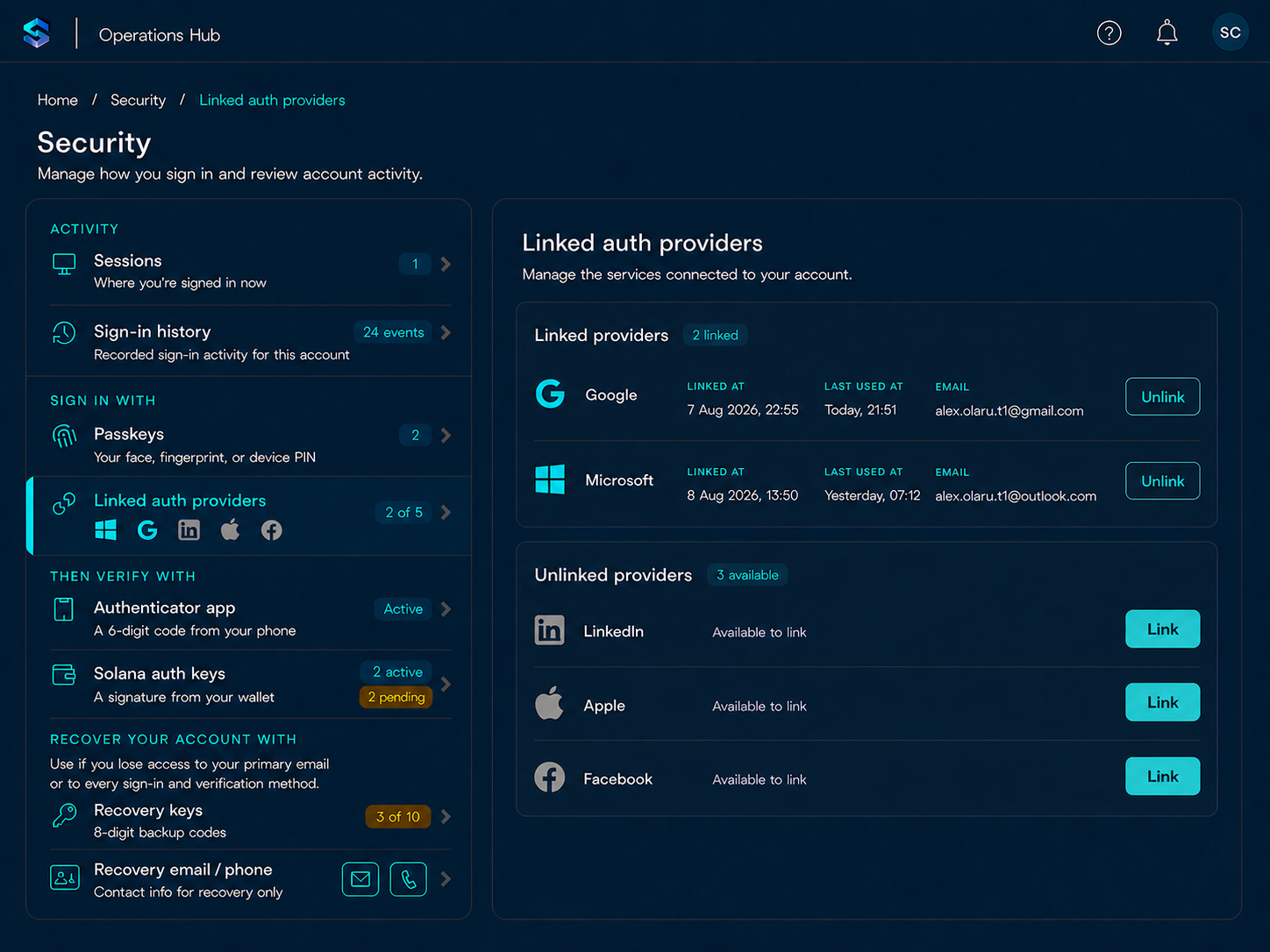
- Don’t make me remember which one of the 3 Social Login options you support, I have used to sign-up for your site with. Allow me to use more than 1 Social Login to sign in to the same account I have setup with your website.
- Help me never get locked out of my account. I don’t want to have to reach out to your help desk (if you even have one) to regain access to my account.
- I understand and love passkeys. But, really, I can have only one setup with your site? And if I lose access to all my passkeys for your site, you have no way to allow me to do a full replace of the old ones with a new set? Why can I do a password reset but I can’t do passkeys resets/replacements?
C. ADDITIONAL VERIFICATIONS / 2FA
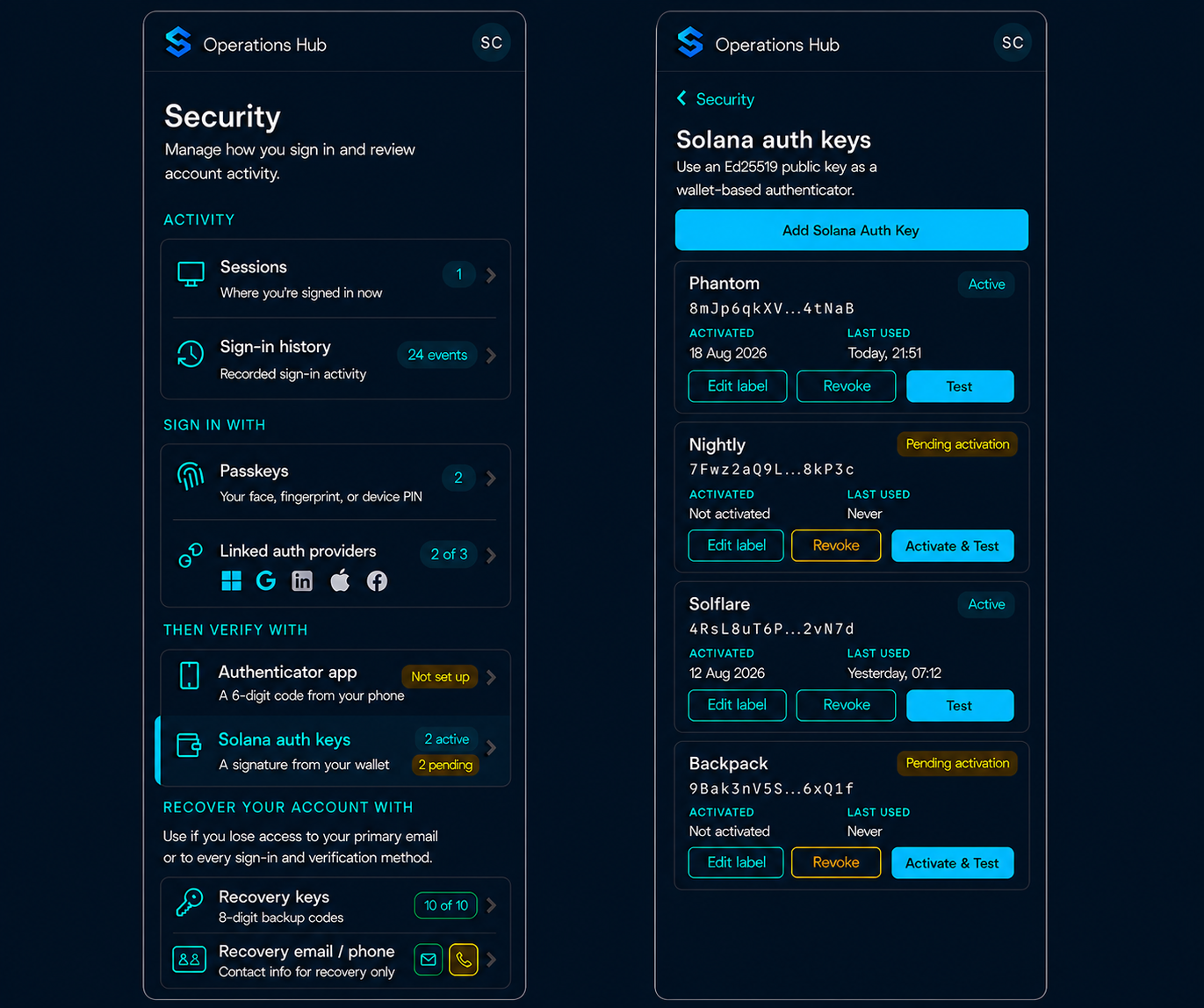
- I use crypto wallets. Some of them hold valuable things in them and my wallets might be more securely configured than my TOTP Authenticator Apps are. I am OK with setting up an Authenticator App for your site, but could I also use such wallets to allow your website to verify me?
- Make it clear when I look at my security dashboard on your website, what authentication mechanisms are used for what. Make it easy for me to understand what is the most secure and resilient setup I can put in place.
- Bump up the verifications needed whenever some important action needs to be accomplished: add/remove authentication methods, your system detects an un-usual sign-in request, I need to replace my passkeys, I am submitting a high-value transaction, I need to change my primary email, etc.
D. KEEP ME INFORMED AND IN-CONTROL
- Send me notification emails whenever significant and unusual events related to authentication occur.
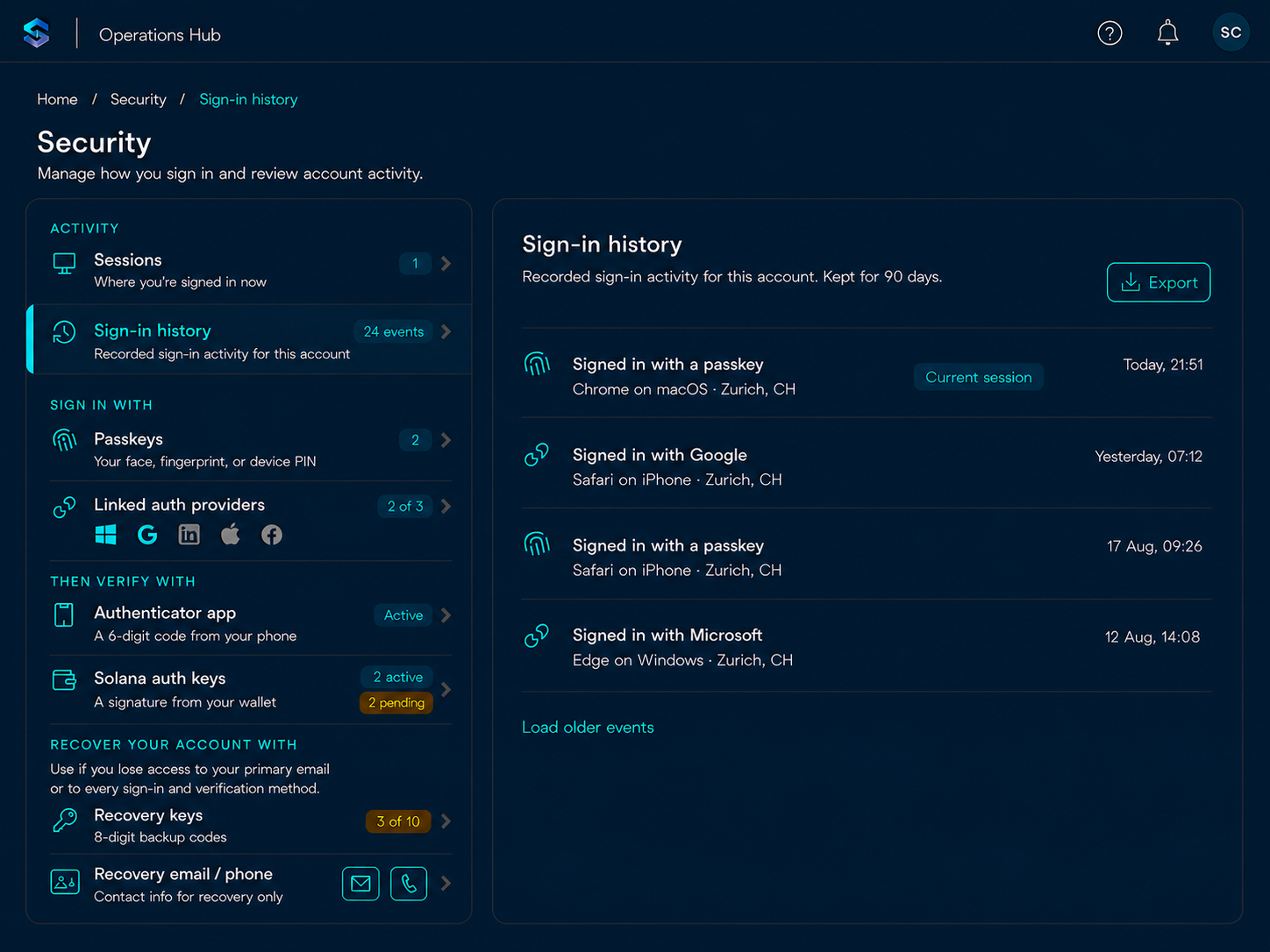
- Allow me to see my sign-in history and my current active logged in sessions: location, device type, etc. Make it easy to logout of all active sessions when I am in doubt about the state of my account.
- I understand that email is often one of the last resort mechanisms to regain access to your system - even then should always be used in combination with one of the other verification mechanisms to re-allow me access. I am ok with getting the short-live magic links for sign-up, my primary email change and passkeys replacements. But don’t send other confidential codes to my email. I want to have nothing to do with my email for regular sign-ins.
E. LAST-RESORT ACCOUNT RECOVERY
- Allow for a last-ditch account recovery mechanism: when I’ve lost access to my primary email and I cannot use it for passkeys reset OR I have lost access to every sign-in and verification method I had setup, then allow me to recover my account with a 2-steps verification process out of 3 possible options: recovery email, recovery phone number or a one-time use recovery/backup code that I should have saved. Make it clear in the UI where these 3 items can be set.
While most of these aspects listed above apply to native applications as well, the focus here is more on authentication from applications running in web browsers (either on a desktop or mobile device) - the main difference being that typically, authentication on native apps on mobile devices, benefits from the existence of secure enclaves which help make the sign-in experience smoother/easier with less effort on the system’s builder side.
These are sample screenshots (desktop and mobile layouts) that try to provide some answers to wishes reflected above:
VII. Implementation Considerations
Let’s unpack a bit more how would could achieve these wishes from an authentication system implementation perspective:
A. Sign-In
Sing-up should be allowed either with a Social Login (Apex Identity providers should always be in the supported list, imo) OR with an email + a passkey. Passkeys sign-ins then are simple: the user just provides the biometrics proof (or in some case a PIN number). No sign-up with a password. Social Logins can frequently leverage SSO thus ofter there is no need for even providing credentials.
B. Backup Sign-in Methods
These are verifications related to providing backup mechanisms for sign-in and for step-up authentication when needed: allow for linking of more Authentication Providers and for more Passkeys, after sign-up. Make it easy to replace either of these.
C. Additional Verifications (2FA)
The majority of security configuration UIs which allow for a variety of verification/authentication mechanisms - but the way these are organized I believe can be overwhelming at best and confusing at worst for many users. Why, because you don’t really understand what is used for what and when. At a minimum these UIs should make it clear what mechanisms are to be used for Sign-In and what mechanisms are to be used for additional verifications (the the important actions) - aka step-up authentication. Or to be used for the Account Recovery, when all bets are off.
Also showing at a glance on the left menu the counts for the various configurations already setup, pending or still to be setup provides a faster mechanism for a user to determine if enough configurations have provided to considerably reduce the chances of an account lockout situation, by not having sufficient backup auth mechanisms setup.
D. Keep me informed and in-control
Pretty self-explanatory - keep me in the loop with what I should know about by send me notification emails to my primary email. Allow me to take action easily with links in the email if there is something critical I need to address.
E. Account Recovery
I am torn on these: if you’ve lost all the items above you’ve probably lost your account recovery codes too (or you never wrote them down to be begin with). I favor a required minimum number auth mechanisms to be setup - e.g. at least:
2 Passkeys + (1 TOTP or 2 wallets)
OR
1 Passkey + 2 Social Logins + TOTP
and if the minimum required is not met the user is not allowed to proceed with using the website’s main functionality until the minimum requirement is met. But I know most systems want to get the user as soon as possible to using the functionality on the site, after a sign-up. Forcing the user to setup multiple Sign-In and Verifications methods might be too much. But even in this scenario, setting up the minimum of 2 Account Recovery configurations should be made mandatory.
F. Passkeys resets
I am not aware of any system providing a mechanism to allow passkeys resets. If I can send a reset email to the use with a short-live magic-link (first factor of authentication), then the user is prompted for a 2FA (TOTP Authenticator App or Solana Wallet) and this verification succeeds too what is the problem with invalidating the user’s old passkeys, and the letting the user set again a new first key (and later add more in the app).
I don’t see one and through my implementation, I found out that this flow is doable. Also, if you try to implement passkeys, for the client side give a strong consideration to using Browser Native APIs -> unless you need passkeys supported on browser versions that are older than 2 years, usage of 3 party library for this is not really needed.
G. Wallets as 2FA
I think some wallets are better secured than TOTP authenticators. Sometimes the reverse is true as well. In any case, I have not really seen systems allowing the use of wallets as a 2nd authentication factor. I am only interested in using them as a second form of authentication - NOT as primary sign-in. I prefer to use a standard here for these type of verifications: I have implemented integration using the Sign-in With Solana (SIWS) standard and have the following findings to share:
1. Wallet Address
There is no need to have the address already existing on Solana in order to be use it a wallet to sign authentication verifications with. When the user adds an address as a second factor of authentication, he / she can:
- use one of their existing addressing in their wallet OR
- an UI affordance provides the use a way to generate an Ed25519 public/private key pair. The public key is saved on the system, the private key is only provided as a one time display to the user so it can be copied and imported in a wallet.
2. Desktop Experience
SIWS Integrations are supported by a good number of wallets in the Solana ecosystem, with some of the most popular ones being: Solflare, Phantom, Backup, Nightly, etc. The integrations work well and the user signs an Authentication verification transaction, in a similar way they would sign for crypto transfer transaction. I found the experience to be smooth.
One caveat: wallets installed as browser extensions are generally considered less secure than their native app mobile equivalents. As such, for certain deployments it might make sense to turn off the capability to allow Wallets as a 2FA on desktops and only allow that to be done through a native app.
3. Mobile Experience
iOS: currently, in order to get integrations between a web app running in a browser to a native app wallet, the wallet needs to run a Safari web extension. And the only setup I found working is using the Nightly wallet, while the webapp requiring the 2FA Wallet verification is accessed through Safari.
Android: SIWS is not supported on in Android and instead I had to the lower level Mobile Wallet Adapter to get the integration to work.
H. Social Logins
Apex IdP providers are preferred for 2 additional reasons:
-
They (Microsoft and Google, not Apple) provide the
email_verifiedJWT claim in the OIDC ID Token. This claim can be reliably used, if set to true, to skip the email verification step when a user signs-up with one of the other 2 providers. For the other Social Login providers, I found out that a good practice is to always verify the email for a newly signed up user. -
Microsoft and Google also advertise the possibility of including the
auth_timeJWT Claim in the OIDC IT Token. This claim represents the time when the user authenticated with the Social Login provider and it is different than the time when the ID Token itself is issued. This claim can help with determining when a login session is considered fresh or not, in certain adaptive step-up authentication decisions. However, I found that this claim in not consistently populated (especially in setups that involve OAuth2 apps that are not yet published to production).
VIII. Conclusion
Once you take the decision to use a IAM Service Provider you are putting a key part of your system in the hands of a vendor. And your user experience for a critical component of your app will be limited to what this service provider supports.
If you are not comfortable with making that decision, believe that actually features provided by these 3rd party systems are actually not that useful for your use case, and its capabilities limit you in the user experience you want to provide, the state of today’s tech primitives needed for these kind of the system components, secure coding practices and use of AI tools to speed up the development processes can offer a compelling alternative for crafting your own solution and UX for a critical part of your system.